

The toolbox contains drawing tools, a color selector, and a freely configurable space for options pages. If you accidentally close the toolbox, you can reopen it by clicking Tools › New Toolbox.
To find out what a particular tool does, hover over its icon. At the very top, there is a drop area which can be used to open any image file by simply dragging and dropping it there.
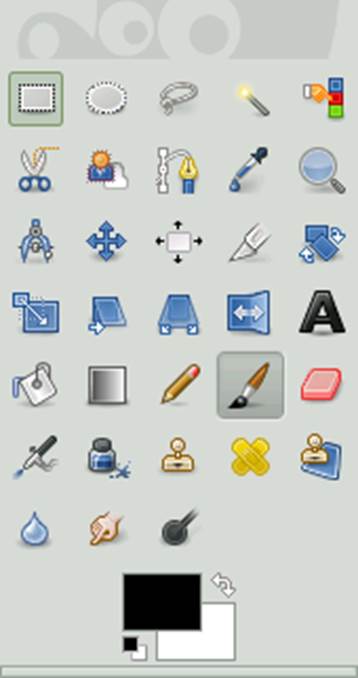
Figure 17.1: The Toolbox
The current foreground and background color are shown in two overlapping boxes. The default colors are black for the foreground and white for the background. Swap the foreground and background color with the bent arrow icon to the upper right of the boxes. Use the black and white icon to the lower left to reset the colors to the default. Click the box to open a color selection dialog.
Under the toolbox, a dialog shows options for the currently selected tool. If it is not visible, open it by double-clicking the icon of the tool in the toolbox.