

You can keep your keys up-to-date by synchronizing keys periodically with remote key servers. Synchronizing will ensure that you have the latest signatures made on all of your keys, so that the Web of trust will be effective.
Click Applications › Utilities › Passwords and Keys.
Click Edit › Preferences, then click the Key Servers tab.
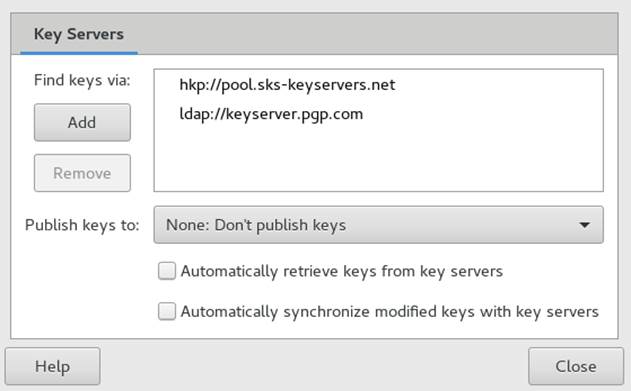
Passwords and Keys provides support for HKP and LDAP key servers.
HKP Key Servers: HKP key servers are ordinary Web-based key servers, such as the popular hkp://pgp.mit.edu:11371, also accessible at http://pgp.mit.edu.
LDAP Key Servers: LDAP key servers are less common, but use the standard LDAP protocol to serve keys. ldap://keyserver.pgp.com is a good LDAP server.
You can Add or Remove key servers to be used using the buttons on the left. To add a new key server, set its type, host and port, if necessary.
Set whether you want to automatically publish your public keys and which key server to use. Set whether you want to automatically retrieve keys from key servers and whether to synchronize modified keys with key servers.
Click Close.