

Global settings can be changed in any LibreOffice module by clicking Tools › Options on the menu bar. This opens the window shown in the figure below. A tree structure is used to display categories of settings.
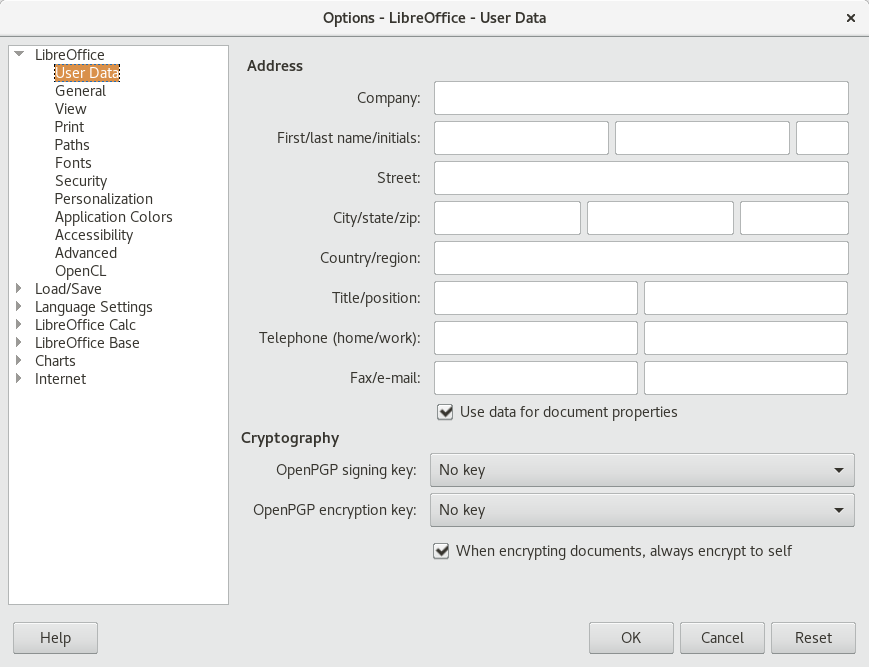
Figure 9.2: The Options Window
The settings categories that appear depend on the module you are working in. For example, if you are in Writer, the LibreOffice Writer category appears in the list, but the LibreOffice Calc category does not. The LibreOffice Base category appears in both Calc and Writer. The Module column in the table shows where each setting category is available.
The following table lists the settings categories along with a brief description of each category:
Table 9.2: Global Setting Categories
|
Settings Category |
Description |
Module |
|
LibreOffice |
Basic settings, including your user data (such as your address and e-mail), important paths, and settings for printers and external programs. |
All |
|
Load/Save |
Settings related to the opening and saving of several file types. There is a dialog for general settings and several special dialogs to define how external formats should be handled. |
All |
|
Language Settings |
Settings related to languages and writing aids, such as your locale and spell checker settings. This is also the place to enable support for Asian languages. |
All |
|
LibreOffice Writer |
Settings related to word processing, such as the basic units, fonts and layout that Writer should use. |
Writer |
|
LibreOffice Writer/Web |
Settings related to the HTML authoring features of LibreOffice. |
Writer |
|
LibreOffice Calc |
Settings related to spreadsheets, such as spreadsheet appearance, Microsoft Excel compatibility options, and calculation options. |
Calc |
|
LibreOffice Impress |
Settings related to presentations, such as enabling the smartphone remote control and the grid of the page to use. |
Impress |
|
LibreOffice Draw |
Settings related to drawings, such as the grid of the page to use. |
Draw |
|
LibreOffice Base |
Allows setting and editing database connections and registered databases. |
Base |
|
Charts |
Allows defining the default colors used for newly created charts. |
All |
|
Internet |
Allows configuring a proxy and the e-mail software to use. |
All |
Important: Settings Apply Globally
All settings listed in the table apply globally for the specified modules. That means, they are used as defaults for every new document you create.